


Release 6.8.3: Edit Mode for the Monitoring Table
Version: 6.8.3
Release 6.8.3 adds an Enable Editing button to the messages table on the Monitoring page, so you can customize the table with ease.
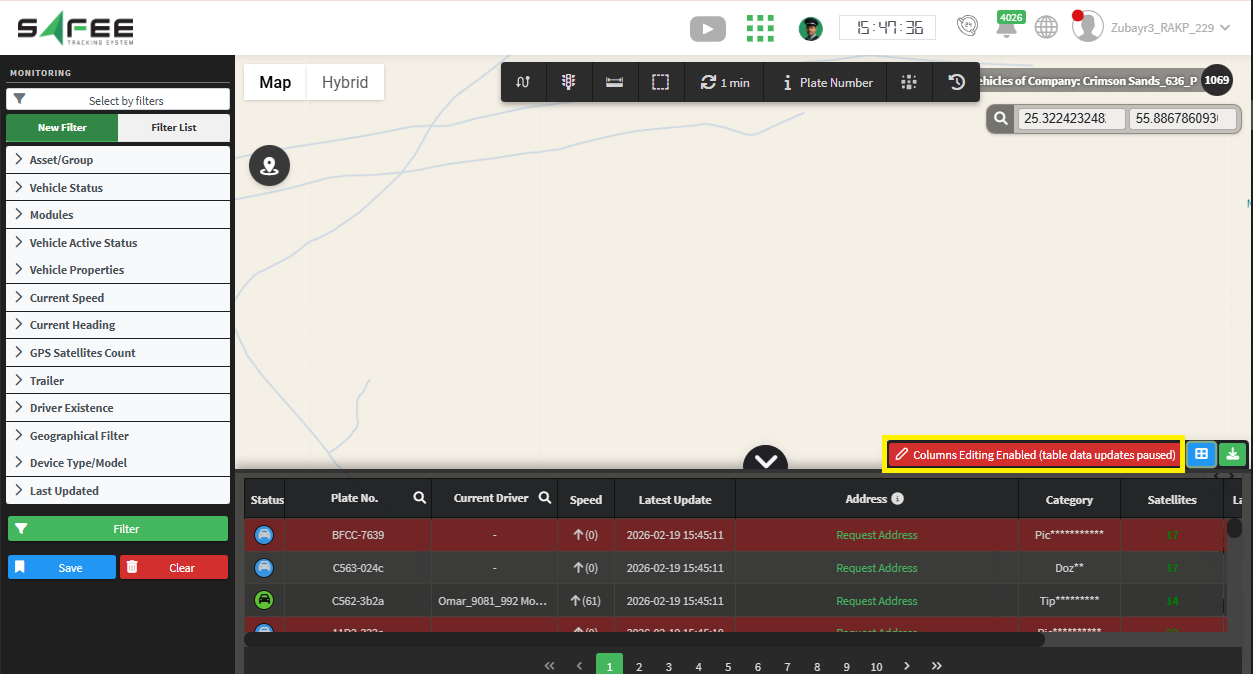
Edit mode for the monitoring table
With edit mode on, you can:
- Customize which columns are displayed.
- Change the order of the displayed columns.
To protect performance
- Edit mode is disabled by default.
- Table data stops updating while edit mode is active.
- Edit mode turns off automatically when you refresh the page, apply filters again, or close the table.
This lets you shape the monitoring table around your needs while keeping everyday use smooth.
For the official release notes, see Release 6.8.3 in the Safee documentation.
Safee Tracking System
Ready to improve your fleet operations?
Tell us what you would like to improve. A Safee specialist will reply by email.
Usually replies within one business day • No sales spam
Your details are used only to respond to your request. Privacy Policy

