


Safee Updates

Release 6.10.2: Background Operations and Driver Reassignment Limit

Version 6.10.2
Choose a release 6.10.2

Safee release 6.10.2 adds a panel for tracking operations processed in the background, a minimum time between dynamic driver reassignments, and a vehicle attribute selector in the Asset Utilization report.

Background Operations panel

A new Background Operations panel helps you monitor bulk operations that run in the background. Open it from the top bar to see the status and progress of each operation.

Background Operations panel in the top bar

For every operation the panel shows:

  • Request Time – when the operation was submitted.
  • Operation Type – the type of operation being processed.
  • Last Update – the latest update to the operation.
  • Overall – total number of jobs.
  • Successful – jobs completed successfully.
  • Failure – jobs that failed.
  • Remaining – jobs still being processed.
Operation status

The status updates automatically as processing progresses: Pending, In Progress, Successful, Failure and Completed.

Status indicator in the top bar

  • A red badge means one or more operations are still in progress.
  • The badge turns neutral when all operations are finished.
  • The icon is hidden when there are no background operations to show.

Minimum time between driver reassignments in Dynamic Driver

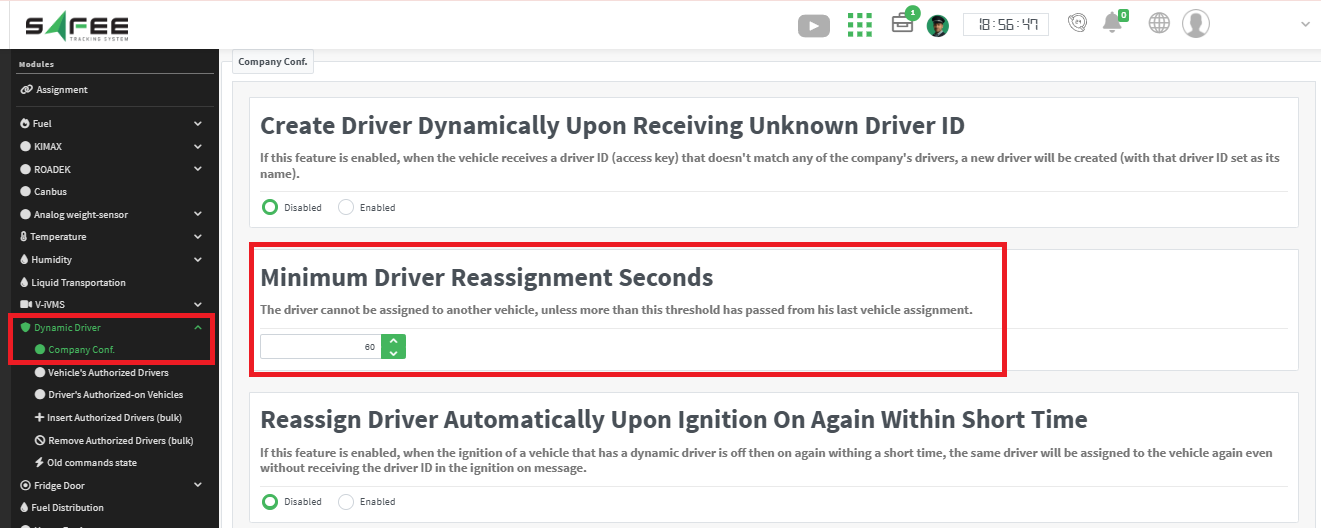
A new configurable threshold on the Dynamic Driver Company Settings page lets administrators define the minimum time (60 seconds by default) between two consecutive driver assignments to different vehicles. It prevents unintended rapid reassignment caused by invalid or duplicate driver messages.

Minimum time between driver reassignments setting

Why it helps:

  • More control over dynamic driver reassignment behavior.
  • Fewer incorrect driver movements between vehicles caused by unreliable data.
  • Each company can set the threshold to match its operations.

We also improved data quality by preventing invalid short-duration assignments and improving the performance of driver assignment records, so they are more accurate and reliable.
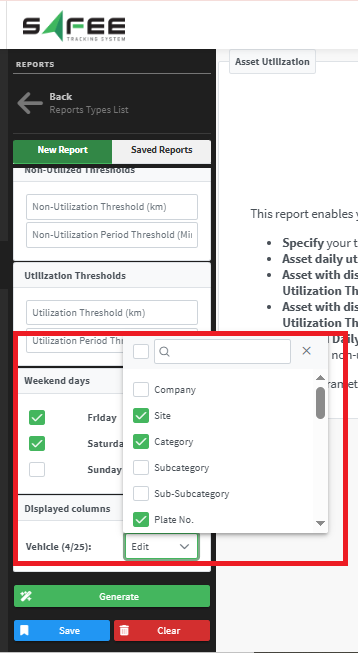
Vehicle attribute selector in the Asset Utilization report

A new Vehicle Attributes selector (displayed columns) replaces the previously fixed attribute columns in the Asset Utilization report inputs, so you choose which vehicle attributes to display. The attributes available in the selector are managed on the Attribute List page under the Management tab.

Vehicle attributes selector in the Asset Utilization report
Safee Tracking System

Ready to improve your fleet operations?

Tell us what you would like to improve. A Safee specialist will reply by email.

Usually replies within one business day • No sales spam

Your details are used only to respond to your request. Privacy Policy

Scroll to Top
