


Release 6.6.15: Geofence Visits Report and Extended Range Handling
Version: 6.6.15
Release 6.6.15 adds a new geofence visits report and improves date range accuracy in several reports.
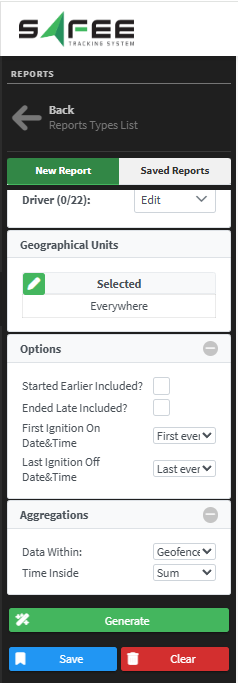
- Select a level, a vehicle or several vehicles, then the date range and the geofences to include.
- Choose whether to include visits that started before the start date, with a maximum time tolerance for the visit start.
- Choose whether to include visits that ended after the end date, with a maximum time tolerance for the visit end.
- Choose what the ignition on and ignition off time columns show.
Those columns show the first ignition-on and last ignition-off event in the range. A vehicle may already be running before the range starts or still off at its end, so each event has three options:
- Ignition-on time (vehicle already running at the start): First event shows the exact time of the first ignition-on event inside the range, which may not appear at all; Match range shows the start of the range; Ignore if ignition is on leaves the column empty.
- Ignition-off time (vehicle already off at the end): Last event shows the time of the last ignition-off event inside the range; Match range shows the end of the range; Ignore if ignition is off leaves the column empty.
Aggregation
- Data within: Geofence visits calculates distance, driving time and the rest only while the vehicle was inside the geofences; Date range shows the data across the whole selected period.
- Time inside: Sum, Average, Min or Max. With Min and Max, the distance, driving time and other values relate to the resulting geofences.
Data is available from 15 April 2025.
Reports enhancement
Idle time, vehicle driving dashboard, distance, speed, fuel consumption, utilization and driving time reports are now more accurate thanks to extended range handling:
- The reports may slightly extend the start and end range to make sure they surround the actual trip data.
- The time between the entered date and time and the actual trip is classified as ignition-off time.
For the official release notes, see Release 6.6.15 in the Safee documentation.
Ready to improve your fleet operations?
Tell us what you would like to improve. A Safee specialist will reply by email.
Usually replies within one business day • No sales spam
Your details are used only to respond to your request. Privacy Policy

