Safee Updates

Release 6.10.0: Amin AI Assistant and Backup Battery

Version 6.10.0
Choose a release 6.10.0

Release 6.10.0 introduces Amin, Safee’s first intelligent chat interface inside the platform (beta), and adds backup battery percentage to device health monitoring.

Meet Amin: your AI assistant inside the platform

Amin is a chat interface designed to help you find answers, understand data and navigate the platform faster. It comes in two tiers, depending on your organization’s licensed plan.

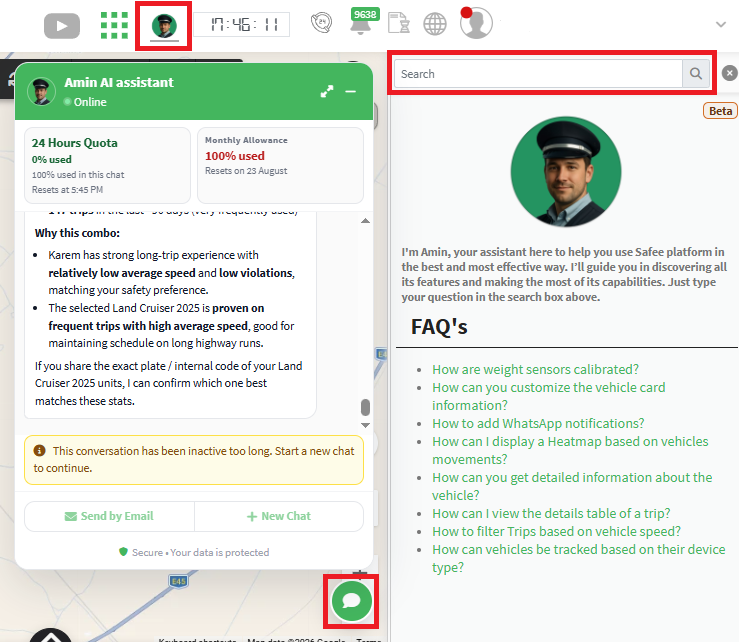
Basic Amin: a searchable knowledge base

Basic Amin is powered by a curated set of pre-approved questions and answers prepared by our support team. Type a keyword or phrase in the search box, and the relevant questions appear; open one to read its full answer. It’s best for quick, verified answers to common how-to questions and troubleshooting steps. If you can’t find your question, contact helpdesk@safee.com.

Basic Amin: searching the question and answer library

Amin AI: your conversational partner

Ask in natural, everyday language, as you would a colleague; Amin AI interprets your intent and generates a tailored answer. It remembers the context of the conversation, so you can ask follow-ups and request clarifications without repeating yourself, and it handles unstructured or “why/how” questions well. It’s best for exploratory analysis and contextual insights.

In short: use Basic Amin for fast look-ups of known facts, and Amin AI when you need a thinking partner for more complex subjects. If the floating Amin icon doesn’t appear on your platform, contact your partner administrator or the platform helpdesk to request activation.

The two tiers of the Amin assistant

Amin AI and standard reports: each has its role

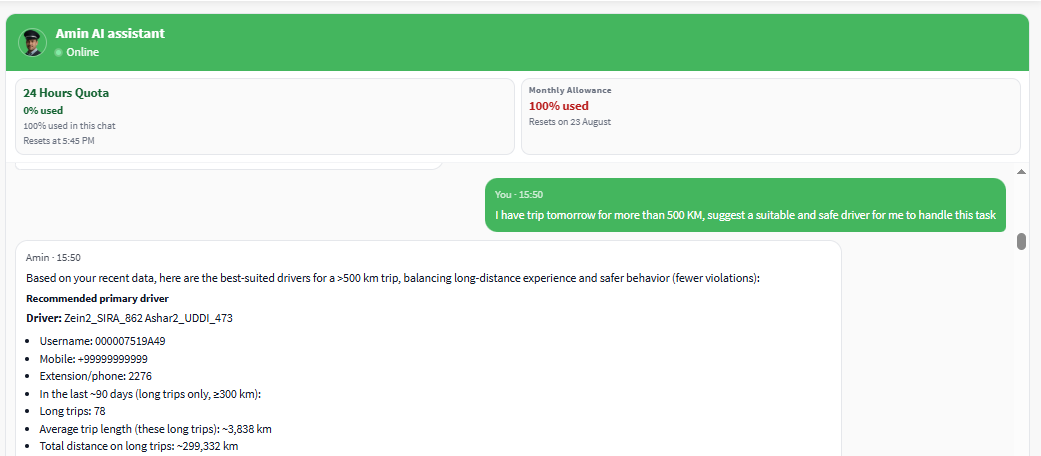
Standard reports and dashboards remain the foundation of your analytics: exact figures, fixed tables, quantitative trends and exportable dashboards. Amin AI is a complementary conversational layer for qualitative “why” and “how” questions, helping you grasp the context of a trend without building a new query. It never alters the underlying source data.

Amin AI alongside standard reports

Chat dashboard and floating chat window

Company admins see the Amin chat bubble on all pages once the feature is enabled. The chat window shows four metrics:

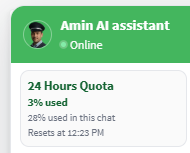
Amin chat window metrics
  1. Session Time Limit – the total duration assigned to your company for this cycle (for example 24 hours). A usage quota is tied to it: if your questions use the whole quota before the timer resets, the input pauses until the reset time.
  2. Overall Usage (%) – the share of the total quota consumed across all chats in this cycle.
  3. Current Chat Usage (%) – the share consumed within the active conversation only.
  4. Reset Time – when the session cycle ends; the quota resets and a new cycle starts as long as the monthly quota hasn’t been exceeded.
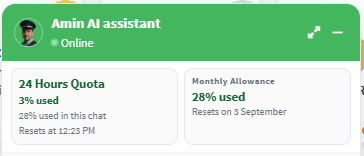
Amin quota and reset time

Consumption is dynamic and depends on the complexity of the question and the amount of information needed. A session also ends automatically after a short idle period to conserve resources, and you can start a new one instantly.

  • Persistent and floating – the window stays visible as you move between pages and the conversation continues.
  • Drag and minimize – drag it anywhere or minimize it to a small bubble with the minus (-) button.
  • Maximize for full view – opens a full page with the active chat next to a list of all your saved chats.

Floating Amin chat window and full view

Managing conversations, feedback and privacy

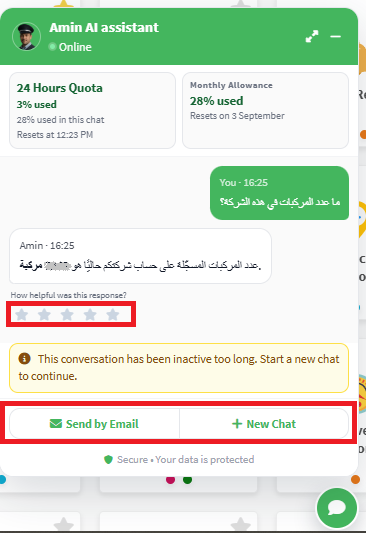
  • New Chat – clears the current window and starts a fresh conversation without manually deleting messages; it doesn’t use extra quota or reset your session time.
  • Send by Email – sends the transcript to the primary email address configured in your company account settings.
Managing Amin conversations and emailing a transcript

After every question to Amin AI you can leave a 5-star rating; as this is a beta, errors may happen, and your feedback helps improve accuracy. On privacy, Amin answers using your fleet data without exposing it to any external party: the model understands your question and generates suitable queries, our internal database engine runs them inside our secure environment, and the answer is sent to the interface.
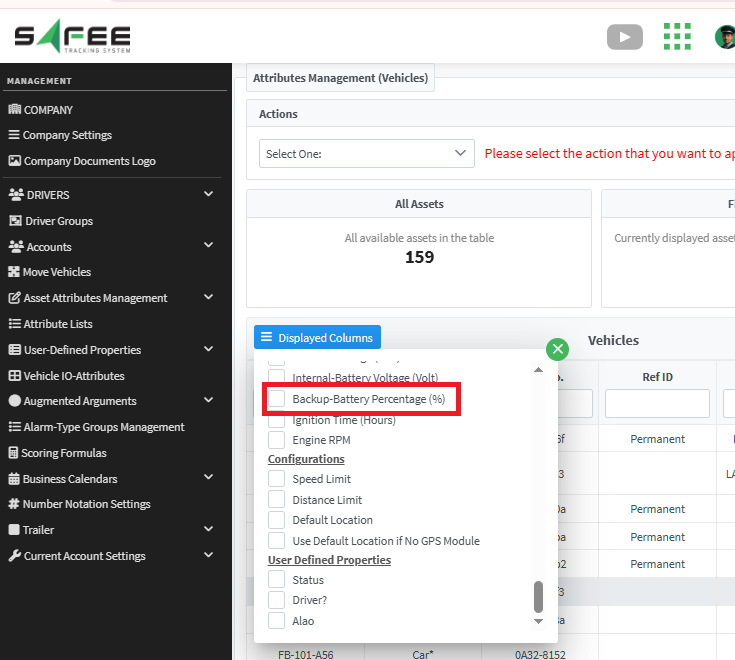
Backup battery percentage for tracking devices

In addition to vehicle battery voltage and the AVL device battery level, you can now view the exact charge percentage of the internal backup battery in the AVL device, completing the picture of your assets’ power status.

Where to find it

  • Monitoring Page – on the live vehicle cards and in the bottom panel table, if enabled.
  • Communication and Message History reports – in the last message summary and the full message history details.
  • Vehicle Explorer and Bulk Management – as an optional column for your vehicle lists.
Backup battery percentage in device health monitoring

Why it matters

The backup battery lets the AVL device keep transmitting when vehicle power is lost. Hardware models report it differently: some send the raw voltage, others the charge percentage directly, and you will see the percentage whenever the device supports it. By monitoring it you can spot aging or failing backup batteries early, schedule maintenance and keep telemetry coverage uninterrupted.

Safee Tracking System

Ready to improve your fleet operations?

Tell us what you would like to improve. A Safee specialist will reply by email.

Usually replies within one business day • No sales spam

Your details are used only to respond to your request. Privacy Policy

Scroll to Top