

Release 6.9.4: Stops and Fridge Door Activity in Vehicle History
Version: 6.9.4
In release 6.9.4, the Vehicle History page shows stops and the Fridge Door activity that happened during them, for vehicles with the Fridge Door module, when the data is available.
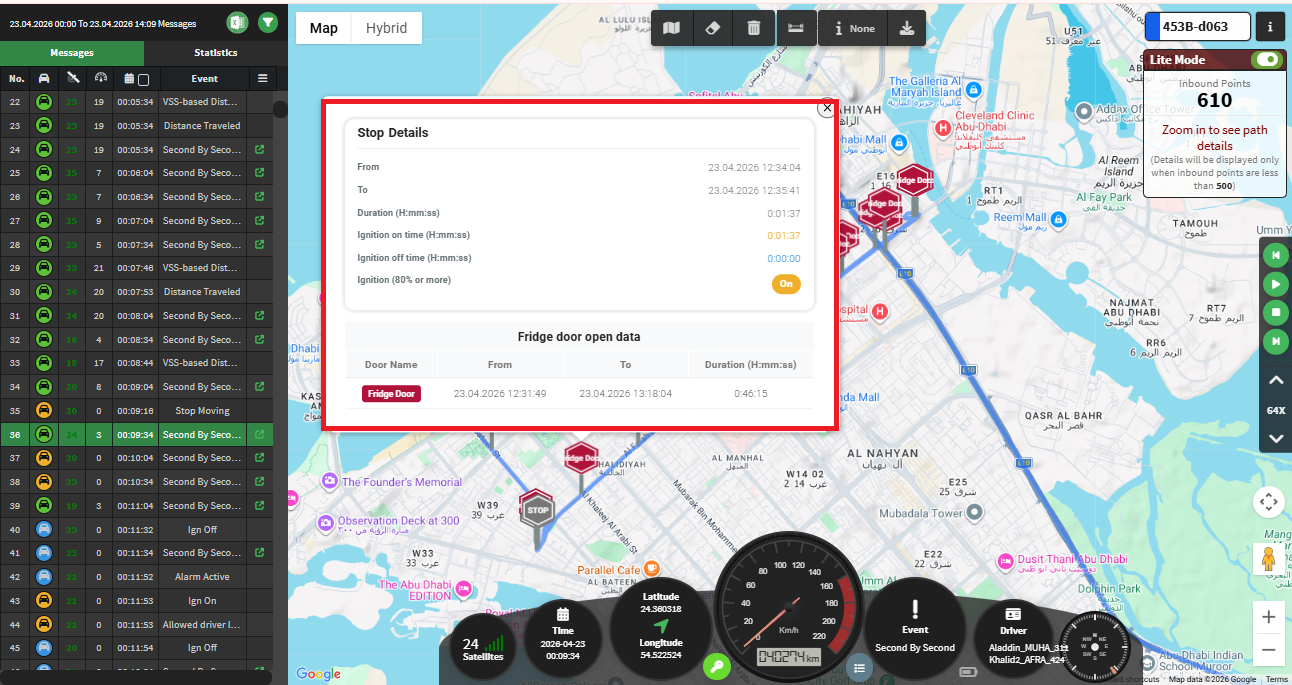
Stops on the map
A vehicle is considered stopped when its speed is 0. Each stop gets a marker that shows what happened with the doors:
- Red “STOP”: no door was opened during the stop.
- Marker in the door’s colour, with its name: one door was opened.
- Gray “STOP”: several doors were opened, or one door was opened more than once.
To keep the map readable, very short stops, such as traffic lights, are ignored unless something important happened, like a door opening or the ignition turning off. Periods when the vehicle is offline are not counted as stops.
Door activity during stops
- A door opening is linked to a stop when it happens during that stop.
- An ongoing door opening is also shown if it started during the stop.
Stop details
Click any stop marker to see:
- The stop duration.
- The door activity during the stop.
- The ignition status (ON or OFF), when it can be determined clearly.
For the official release notes, see Release 6.9.4 in the Safee documentation.
Ready to improve your fleet operations?
Tell us what you would like to improve. A Safee specialist will reply by email.
Usually replies within one business day • No sales spam
Your details are used only to respond to your request. Privacy Policy

