

Release 6.7.5: History Links in the Device Specific Events Report
Version: 6.7.5
Release 6.7.5 adds two options to the Device Specific Events report that open the vehicle’s history around each event in one click.
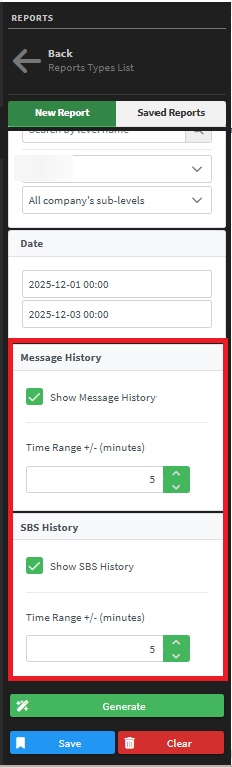
- The results gain a new Message history column with a Show History link.
- The link opens the Vehicle Path History page in a new tab, automatically filtered to the selected time range for that vehicle.

Show Second-by-second (SBS) option
A new Show SBS input was added to the report filter panel. Turn it on to enter a custom time range in minutes (default: ±5 minutes).
- The results gain a new SBS History column with a Show SBS link.
- The link opens the Second-by-Second Report page in a new tab, pre-filtered for the selected vehicle and time range, like the existing dialog.
For the official release notes, see Release 6.7.5 in the Safee documentation.
Safee Tracking System
Ready to improve your fleet operations?
Tell us what you would like to improve. A Safee specialist will reply by email.
Usually replies within one business day • No sales spam
Your details are used only to respond to your request. Privacy Policy

