

Release 6.6.2: Trip Start and End Geofences and Command History
Version: 6.6.2
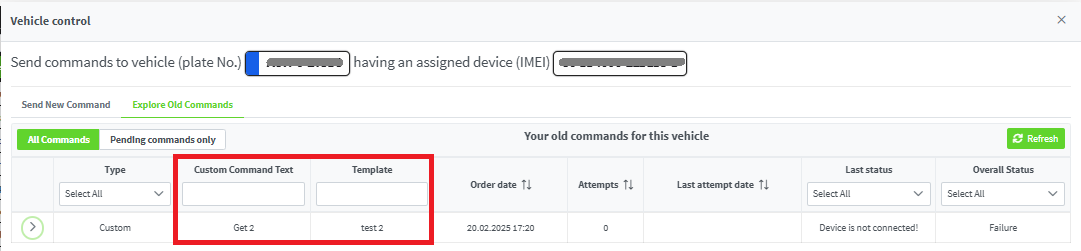
Release 6.6.2 adds two columns to the Trips page showing the geofences at the start and end of each trip, and improves the command history table.
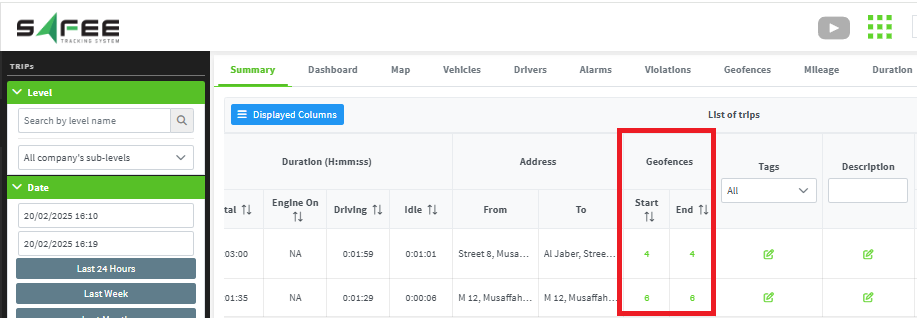
- Each column shows a clickable number of geofences.
- Clicking the number opens a popup with the names of the geofences at the trip start or end.
- If a geofence was deleted after vehicles passed through it, its name will not appear.
- Passes are counted from the moment the geofence was created; older passes from the same area are not considered.
- Custom commands text: the text of the command sent to the device, when the custom command type was used.
- Template: the name of the template being executed.
For the official release notes, see Release 6.6.2 in the Safee documentation.
Safee Tracking System
Ready to improve your fleet operations?
Tell us what you would like to improve. A Safee specialist will reply by email.
Usually replies within one business day • No sales spam
Your details are used only to respond to your request. Privacy Policy

