

Release 6.6.1: Multiple Vehicle History Enhancements
Version: 6.6.1
Release 6.6.1 brings new enhancements to the advanced Multiple Vehicle History feature.
- A new clickable icon on the map in the Monitoring page takes you to a blank history page with rich filters that help your tracking.
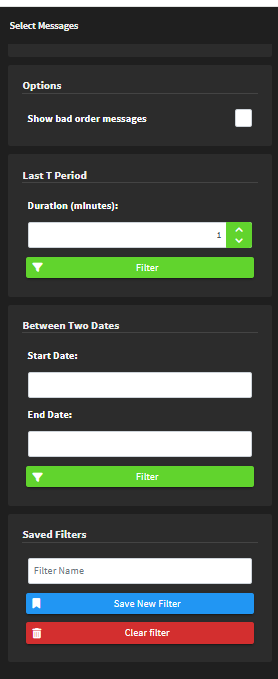
- The new filters support choosing single or multiple levels, showing out-of-order messages, filtering for the last period of time, or filtering between two dates.
- After setting up your filters, you can save them for faster access.

The maximum number of vehicles allowed in multi-vehicle history is still controlled by your partner.
For the official release notes, see Release 6.6.1 in the Safee documentation.
Safee Tracking System
Ready to improve your fleet operations?
Tell us what you would like to improve. A Safee specialist will reply by email.
Usually replies within one business day • No sales spam
Your details are used only to respond to your request. Privacy Policy

