


Release 6.5.27: Geofence Visits Report
Version: 6.5.27
Release 6.5.27 introduces a new Geofence Visits report with statistics such as time elapsed, distance traveled, driving time and idle time inside geofences.
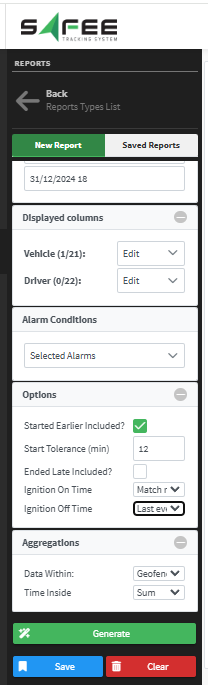
Report inputs
- Select a level, a single vehicle or multiple vehicles.
- Define the date range of interest.
- Choose one or more instances of the Time Inside a Geofence alarm condition.
- Include alarms that started before the selected date range, with a configurable time tolerance.
- Include alarms that ended after the selected date range, with a configurable time tolerance.
Ignition-on events
- First event: the report shows the time of the first event after the range start.
- Match range: shows the start time of the date range.
- Ignore if already on: leaves the column empty if the vehicle was already ignited.
Ignition-off events
- Last event: shows the time of the last event within the range.
- Match range: shows the end time of the date range.
- Ignore if no ignition off: leaves the column empty if the vehicle was already off.
Aggregation settings
- Data within: geofence visits (data during visits only) or the full date range.
- Time inside: sum, average, minimum or maximum.
Prerequisites
The report relies on configured instances of the Time Inside a Geofence alarm condition. Access to the report is controlled by a permission granted from a partner account.
For the official release notes, see Release 6.5.27 in the Safee documentation.
Safee Tracking System
Ready to improve your fleet operations?
Tell us what you would like to improve. A Safee specialist will reply by email.
Usually replies within one business day • No sales spam
Your details are used only to respond to your request. Privacy Policy

